Picocli
Picocli is a command line parser that supports usage help with ANSI colors, autocomplete and nested subcommands. It has an annotations API to create command line applications with almost no code, and a programmatic API for dynamic uses like creating Domain Specific Languages.
From the project Readme page:
It generates polished and easily tailored usage help
and version help ,
using ANSI colors where possible.
Picocli-based command line applications can have TAB autocompletion ,
interactively showing users what options and subcommands are available.
Picocli can generate completion scripts for bash and zsh, and offers an API to easily create a JLine Completer for your application.
Micronaut features dedicated support for defining picocli Command instances. Micronaut applications built with picocli can be deployed with or without the presence of an HTTP server.
Combining picocli with Micronaut makes it easy to provide a rich, well-documented command line interface for your Microservices.
For this project, you can find a list of releases (with release notes) here:
3 Create Micronaut Picocli app
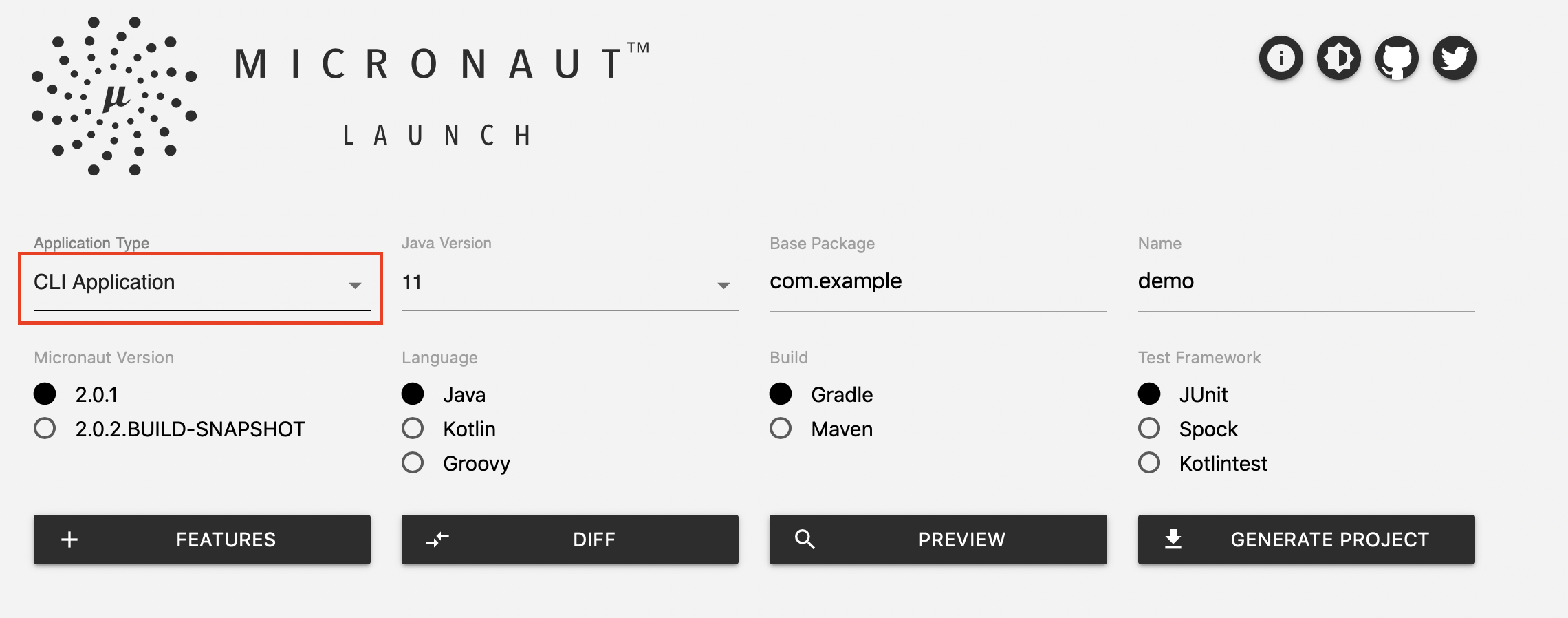
You can create a Micronaut command line interface application using the Micronaut CLI:
Example 1. Using the CLI
$ mn create-cli-app my-app
To add support for Picocli to an existing project, you should first add the picocli dependency and the Micronaut picocli configuration to your build configuration.
implementation ("io.micronaut.picocli:micronaut-picocli" )<dependency >
<groupId >io.micronaut.picocli</groupId >
<artifactId >micronaut-picocli</artifactId >
</dependency >
The picocli-codegen module includes an annotation processor that can build a model from the picocli annotations at compile time rather than at runtime. Enabling this annotation processor in your project is optional, but recommended .
annotationProcessor ("info.picocli:picocli-codegen" )<annotationProcessorPaths >
<path >
<groupId >info.picocli</groupId >
<artifactId >picocli-codegen</artifactId >
</path >
</annotationProcessorPaths >
Configuring picocli
Picocli does not require configuration. See other sections of the manual for configuring the services and resources to inject.
5 Generating a Picocli Project
To create a project with picocli support using the Micronaut CLI, use the create-cli-app command.
This will add the dependencies for the picocli feature, and set the applicationType of the generated project to cli, so the create-command command is available to generate additional commands.
The main class of the project is set to the *Command class (based on the project name - e.g., hello-world will generate HelloWorldCommand):
$ mn create-cli-app my-cli-app
The generated command looks like this:
my.cli.app.MyCliAppCommand.java generated by create-cli-app
import io.micronaut.configuration.picocli.PicocliRunner;import org.slf4j.Logger;import picocli.CommandLine.Command;import picocli.CommandLine.Option;import static org.slf4j.LoggerFactory.getLogger;@Command (name = "my-cli-app" , description = "..." , mixinStandardHelpOptions = true ) //
public class MyCliAppCommand implements Runnable { // private static final Logger LOG = getLogger (MyCliAppCommand.class); @Option (names = {"-v" , "--verbose" }, description = "..." ) //
boolean verbose; public static void main (String [] args ) throws Exception { PicocliRunner.run (MyCliAppCommand.class, args); //
}
public void run () { // // business logic here if (verbose) { LOG.info ("Hi!" );
}
}
} import io.micronaut.configuration.picocli.PicocliRunner import org.slf4j.LoggerFactory import picocli.CommandLine.Command import picocli.CommandLine.Option @Command (name = "my-cli-app" , description = ["..." ], mixinStandardHelpOptions = true ) // class MyCliAppCommand : Runnable { // @Option (names = ["-v" , "--verbose" ], description = ["..." ]) // var verbose = false companion object { private val LOG = LoggerFactory.getLogger (MyCliAppCommand::class .java) @Throws (Exception::class ) @JvmStatic fun main (args: Array <String >) { PicocliRunner.run (MyCliAppCommand::class .java, * args) //
}
}
override fun run () { // // business logic here if (verbose) { LOG.info ("Hi!" )
}
}
} import io.micronaut.configuration.picocli.PicocliRunnerimport org.slf4j.Loggerimport picocli.CommandLine.Commandimport picocli.CommandLine.Optionimport static org.slf4j.LoggerFactory.getLogger@Command (name = 'my-cli-app' , description = '...' , mixinStandardHelpOptions = true ) // class MyCliAppCommand implements Runnable { // private static final Logger LOG = getLogger( MyCliAppCommand. class) @Option (names = ['-v' , '--verbose' ], description = '...' ) // boolean verbose static void main (String [] args ) throws Exception { PicocliRunner. run(MyCliAppCommand. class, args) // }
void run () { // // business logic here if (verbose) { LOG . info("Hi!" ) }
}
}
Running the Application
Now you can build the project and start the application. Generate an executable Jar . When you run this JAR, it executes the MyCliAppCommand command.
$ ./gradlew shadowJar $ java -jar build/libs/my-cli-app-0.1-all.jar -v $ ./mvnw package $ java -jar target/my-cli-app-0.1.jar -v
Creating a Picocli Command with @Command
This section will show a quick example that provides a command line interface to a HTTP client that communicates with the GitHub API.
When creating this example project with the Micronaut CLI, use the create-cli-app command, and add the --features=http-client flag:
$ mn create-cli-app example.git-star --features http-client
This will add the io.micronaut:micronaut-http-client dependency to the build. You can also manually add to your build:
implementation ("io.micronaut.picocli:micronaut-http-client" )<dependency >
<groupId >io.micronaut.picocli</groupId >
<artifactId >micronaut-http-client</artifactId >
</dependency >
An Example HTTP Client
To create a picocli Command you create a class with fields annotated with @Option or @Parameters to capture the values of the command line options or positional parameters, respectively.
For example the following is a picocli @Command that wraps around the GitHub API:
Example picocli command with injected HTTP client
import io.micronaut.configuration.picocli.PicocliRunner;import io.micronaut.http.HttpRequest;import io.micronaut.http.client.BlockingHttpClient;import io.micronaut.http.client.HttpClient;import io.micronaut.http.client.annotation.Client;import jakarta.inject.Inject;import picocli.CommandLine.Command;import picocli.CommandLine.Option;import picocli.CommandLine.Parameters;import java.util.Arrays;import java.util.List;import java.util.Map;@Command (name = "git-star" , header = {
"@|green _ _ _ |@" , // "@|green __ _(_) |_ __| |_ __ _ _ _ |@" , "@|green / _` | | _(_-< _/ _` | '_| |@" , "@|green \\ __, |_| \\ __/__/ \\ __ \\ __,_|_|@" , "@|green |___/ |@" }, description = "Shows GitHub stars for a project" , mixinStandardHelpOptions = true , version = "git-star 0.1" ) // public class GitStarCommand implements Runnable { @Client ("https://api.github.com" )
@Inject
HttpClient client; //
@Option (names = { "-v" , "--verbose" }, description = "Shows some project details" )
boolean verbose; @Parameters ( //
description = { "One or more GitHub slugs (comma separated) to show stargazers for. Default: ${DEFAULT-VALUE}" },
split = "," , paramLabel = "<owner/repo>" )
List< String > githubSlugs = Arrays.asList ("micronaut-projects/micronaut-core" , "remkop/picocli" );
public void run () { // BlockingHttpClient blockingClient = client.toBlocking ();
for (String slug : githubSlugs) { HttpRequest< Object > httpRequest = HttpRequest.GET ("/repos/" + slug)
.header ("User-Agent" , "remkop-picocli" );
Map< ? , ? > m = blockingClient.retrieve (httpRequest, Map.class);
System.out.printf ("%s has %s stars%n" , slug, m.get ("watchers" ));
if (verbose) { String msg = "Description: %s%nLicense: %s%nForks: %s%nOpen issues: %s%n%n" ;
System.out.printf (msg, m.get ("description" ),
((Map<? ,?> ) m.get ("license" )).get ("name" ),
m.get ("forks" ), m.get ("open_issues" ));
}
}
}
public static void main (String [] args ) { int exitCode = PicocliRunner.execute (GitStarCommand.class, args); System.exit (exitCode);
}
} import io.micronaut.configuration.picocli.PicocliRunner import io.micronaut.http.HttpRequest import io.micronaut.http.client.HttpClient import io.micronaut.http.client.annotation.Client import jakarta.inject.Inject import picocli.CommandLine.Command import picocli.CommandLine.Option import picocli.CommandLine.Parameters import kotlin.system.exitProcess @Command ( name = "git-star" ,
header = [
"@|green _ _ _ |@" , // "@|green __ _(_) |_ __| |_ __ _ _ _ |@" , "@|green / _` | | _(_-< _/ _` | '_| |@" , "@|green \\ __, |_| \\ __/__/ \\ __ \\ __,_|_|@" , "@|green |___/ |@" ], description = ["Shows GitHub stars for a project" ],
mixinStandardHelpOptions = true ,
version = ["git-star 0.1" ] //
)
class GitStarCommand : Runnable { @Inject @field :Client ("https ://api.github.com /") lateinit var client: HttpClient // @Option (names = ["-v" , "--verbose" ], description = ["Shows some project details" ]) var verbose = false @Parameters ( // description = ["One or more GitHub slugs (comma separated) to show stargazers for. Default: \$ {DEFAULT-VALUE}" ],
split = "," ,
paramLabel = "<owner/repo>"
)
var githubSlugs: List <String > = mutableListOf ("micronaut-projects/micronaut-core" , "remkop/picocli" ) override fun run () { // val blockingClient = client.toBlocking () githubSlugs.forEach { slug ->
val httpRequest = HttpRequest.GET <Any >("repos/ $slug " ) .header ("User-Agent" , "remkop-picocli" )
val m = blockingClient.retrieve (httpRequest, Map::class .java) println (" $slug has ${m["watchers"]} stars" ) if (verbose) { println ("""Description: ${m["description"]} |License: ${(m["license"] as Map <* , *> )["name"]} |Forks: ${m["forks"]} |Open issues: ${m["open_issues"]} |""" .trimMargin ()) }
}
}
companion object { @JvmStatic fun main (args: Array <String >) { val exitCode = PicocliRunner.execute (GitStarCommand::class .java, * args) exitProcess (exitCode) }
}
} import io.micronaut.configuration.picocli.PicocliRunnerimport io.micronaut.http.HttpRequestimport io.micronaut.http.client.BlockingHttpClientimport io.micronaut.http.client.HttpClientimport io.micronaut.http.client.annotation.*import picocli.CommandLine.Commandimport picocli.CommandLine.Optionimport picocli.CommandLine.Parametersimport jakarta.inject.Inject@Command (name = 'git-star' , header = [ "@|green _ _ _ |@" , // "@|green __ _(_) |_ __| |_ __ _ _ _ |@" , "@|green / _` | | _(_-< _/ _` | '_| |@" , "@|green \\ __, |_| \\ __/__/ \\ __ \\ __,_|_|@" , "@|green |___/ |@" ], description = 'Shows GitHub stars for a project' , mixinStandardHelpOptions = true , version = 'git-star 0.1' ) // class GitStarCommand implements Runnable { @Client ('https://api.github.com' ) @Inject HttpClient client // @Option (names = ['-v' , '--verbose' ], description = 'Shows some project details' ) boolean verbose @Parameters ( // description = [ 'One or more GitHub slugs (comma separated) to show stargazers for. Default: ${DEFAULT-VALUE}' ],
split = ',' , paramLabel = '<owner/repo>' )
List<String> githubSlugs = ['micronaut-projects/micronaut-core' , 'remkop/picocli' ] void run () { // BlockingHttpClient blockingClient = client. toBlocking() githubSlugs. each { slug ->
HttpRequest<Object> httpRequest = HttpRequest. GET ("/repos/ $slug" ) .header('User-Agent' , 'remkop-picocli' )
Map<?,?> m = blockingClient. retrieve(httpRequest, Map. class) println (" $slug has ${ m.watchers } stars" ) if (verbose) { println """Description: ${ m.description } |License: ${ m.license?.name } |Forks: ${ m.forks } |Open issues: ${ m.open_issues } |""" . stripMargin() }
}
}
static void main (String [] args ) { int exitCode = PicocliRunner. execute(GitStarCommand , args) System. exit(exitCode) }
}
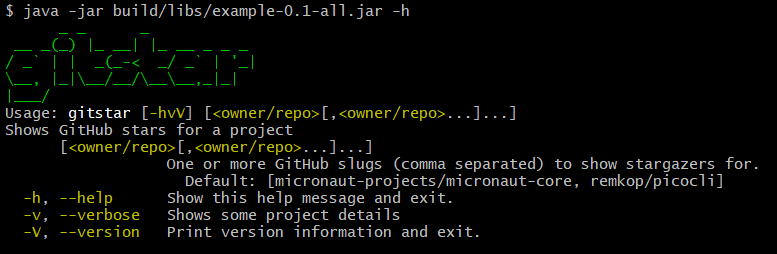
The usage help message generated for this command looks like this:
If your service has a lot of functionality, a common pattern is to have subcommands to control different areas of the service.
To allow Micronaut to inject services and resources correctly into the subcommands,
make sure to obtain subcommand instances from the ApplicationContext, instead of instantiating them directly.
The easiest way to do this is to declare the subcommands on the top-level command, like this:
A top-level command with subcommands
import picocli.CommandLine.Command;import io.micronaut.configuration.picocli.PicocliRunner;import java.util.concurrent.Callable;@Command (name = "topcmd" , subcommands = {SubCmd1.class, SubCmd2.class}) //
public class TopCommand implements Callable <Object > { // public static void main (String [] args ) { PicocliRunner.execute (TopCommand.class, args); //
}
@Override
public Object call () throws Exception { return "Hi Top Command!" ; }
}
@Command (name = "subcmd1" )
class SubCmd1 implements Callable <Object > { // @Override
public Object call () throws Exception { return "Hi Sub Command 1!" ; }
}
@Command (name = "subcmd2" )
class SubCmd2 implements Callable <Object > { // @Override
public Object call () throws Exception { return "Hi Sub Command 2!" ; }
} import io.micronaut.configuration.picocli.PicocliRunner import picocli.CommandLine.Command import java.util.concurrent.Callable @Command (name = "topcmd" , subcommands = [SubCmd1::class , SubCmd2::class ]) // class TopCommand : Callable <Any > { // companion object { @JvmStatic fun main (args: Array <String >) { PicocliRunner.execute (TopCommand::class .java, * args) //
}
}
@Throws (Exception::class ) override fun call (): Any { return "Hi Top Command!" }
}
@Command (name = "subcmd1" )internal class SubCmd1 : Callable <Any > { // @Throws (Exception::class ) override fun call (): Any { return "Hi Sub Command 1!" }
}
@Command (name = "subcmd2" )internal class SubCmd2 : Callable <Any > { // @Throws (Exception::class ) override fun call (): Any { return "Hi Sub Command 2!" }
} import picocli.CommandLine.Commandimport io.micronaut.configuration.picocli.PicocliRunnerimport java.util.concurrent.Callable@Command (name = 'topcmd' , subcommands = [ SubCmd1 , SubCmd2 ]) // class TopCommand implements Callable<Object> { // static void main (String [] args ) { PicocliRunner. execute(TopCommand. class, args) // }
@Override Object call () throws Exception { 'Hi Top Command!' }
}
@Command (name = 'subcmd1' )class SubCmd1 implements Callable<Object> { // @Override Object call () throws Exception { 'Hi Sub Command 1!' }
}
@Command (name = 'subcmd2' )class SubCmd2 implements Callable<Object> { // @Override Object call () throws Exception { 'Hi Sub Command 2!' }
}
Occasionally you may want to set parser options or otherwise customize picocli behavior.
This can easily be done via the setter methods on the picocli CommandLine object, but the PicocliRunner does not expose that object.
In such cases, you may want to invoke picocli directly instead of using the PicocliRunner.
The code below demonstrates how to do this:
Example of customizing the picocli parser before invoking a command
import io.micronaut.configuration.picocli.MicronautFactory;import io.micronaut.context.ApplicationContext;import io.micronaut.context.env.Environment;import picocli.CommandLine;import picocli.CommandLine.* ;import java.util.concurrent.Callable;@Command (name = "configuration-example" )
public class ConfigDemo implements Callable <Object > { private static int execute (Class<? > clazz , String [] args ) { try (ApplicationContext context = ApplicationContext.builder ( clazz, Environment.CLI).start ()) { //
return new CommandLine (clazz, new MicronautFactory (context)). // setCaseInsensitiveEnumValuesAllowed (true ). // setUsageHelpAutoWidth (true ). // execute (args); // }
}
public static void main (String [] args ) { int exitCode = execute (ConfigDemo.class, args); System.exit (exitCode); //
}
@Override
public Object call () { return "Hi!" ; }
} import io.micronaut.configuration.picocli.MicronautFactory import io.micronaut.context.ApplicationContext import io.micronaut.context.env.Environment import picocli.CommandLine import picocli.CommandLine.Command import java.util.concurrent.Callable import kotlin.system.exitProcess @Command (name = "configuration-example" )class ConfigDemo : Callable <Any > { companion object { private fun execute (clazz: Class <*>, args: Array <String >): Int { ApplicationContext.builder (clazz, Environment.CLI).start ().use { context -> //
return CommandLine (clazz, MicronautFactory (context)). // setCaseInsensitiveEnumValuesAllowed (true ). // setUsageHelpAutoWidth (true ). // execute (* args) // }
}
@JvmStatic fun main (args: Array <String >) { val exitCode = execute (ConfigDemo::class .java, args) exitProcess (exitCode) // }
}
override fun call (): Any { return "Hi!" }
} import io.micronaut.configuration.picocli.MicronautFactoryimport io.micronaut.context.ApplicationContextimport io.micronaut.context.env.Environmentimport picocli.CommandLineimport picocli.CommandLine.Commandimport java.util.concurrent.Callable@Command (name = 'configuration-example' )class ConfigDemo implements Callable<Object> { private static int execute (Class<?> clazz , String [] args ) { try (ApplicationContext context = ApplicationContext. builder( clazz, Environment. CLI ). start()) { //
new CommandLine (clazz, new MicronautFactory (context)). // setCaseInsensitiveEnumValuesAllowed(true ). //
setUsageHelpAutoWidth(true ). //
execute(args) //
}
}
static void main (String [] args ) { int exitCode = execute(ConfigDemo. class, args) System. exit(exitCode) // }
@Override Object call () { 'Hi!' }
}
You can find the source code of this project in this repository: