Configure default project gcloud config set project YOUR_PROJECT_ID
Authenticate with gcloud auth login
Authenticate application default credential with gcloud auth application-default login
It’s strongly recommended that you use a Service Account for your application.
Google Project ID
The module features a base GoogleCloudConfiguration which you can use to configure or retrieve the GCP Project ID:
You can inject this bean and use the getProjectId() method to retrieve the configured or detected project ID.
Google Credentials
The module will setup a bean of exposing the com.google.auth.oauth2.GoogleCredentials instance that are either detected from the local environment or configured by GoogleCredentialsConfiguration:
Debug Logging
The underlying GCP SDK libraries use the standard java.util.logging package (JUL) for log statements. The libraries are fairly conservative in what they log by default. If you need to debug the GCP libraries' activity, especially their GRPC-based communication with the GCP cloud services, it can be useful to turn up the logging level. In order to do this in conjunction with the framework’s SLF4J-based logging, it is necessary to perform some additional setup to enable the JUL bridge library for SLF4J.
Warning
There is an unavoidable performance impact to enabled JUL log statements when using the jul-to-slf4j bridge, thus it is advised to be conservative in enabling this configuration, preferably only for debugging purposes.
To enable the GCP library debug logging, first add the jul-to-slf4j.jar dependency to your classpath:
dependency::org.slf4j:jul-to-slf4j:2.0.9[scope="runtimeOnly"]
Next you can either enable the JUL bridge class SLF4JBridgeHandler programmatically during application initialization (such as in the main method of your application), or by adding the following line to a logging.properties file on your classpath (see the SLF4JBridgeHandler javadocs for more details):
handlers = org.slf4j.bridge.SLF4JBridgeHandler
Next add the following configuration for LevelChangePropagator (which eliminates the performance impact of disabled JUL log statements) to your SLF4J configuration:
<configuration> <contextListener class="ch.qos.logback.classic.jul.LevelChangePropagator"/> <!-- rest of the configuration file .... --></configuration>
Once this is done, you can set the logging level for GCP library classes in the usual manner using SLF4J configuration.
3 Release History
For this project, you can find a list of releases (with release notes) here:
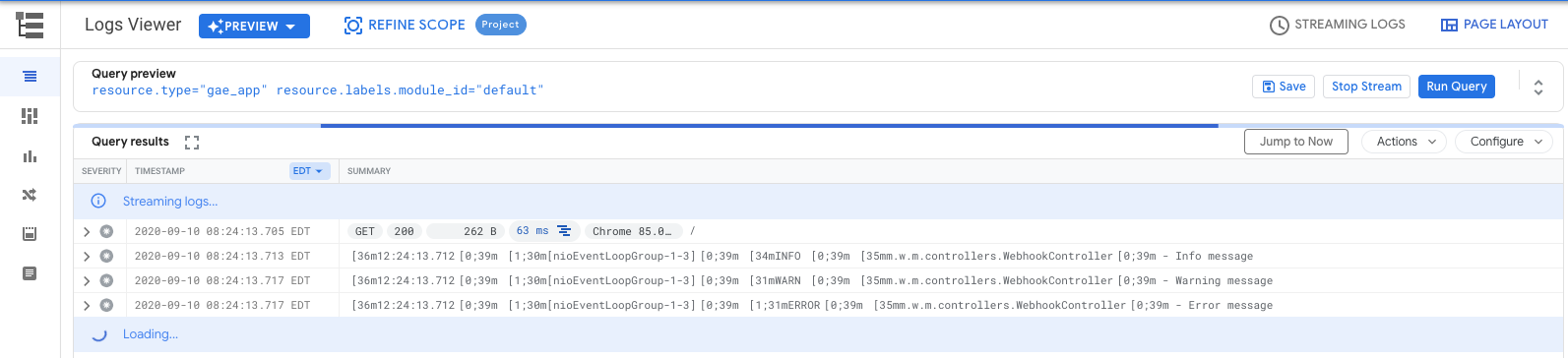
By default if an application is using a CONSOLE appender Stackdriver log parser will
consider the entire payload of the message as a text entry, making searching and correlation with tracing impractical.
Logs on the picture above can’t be searched by attributes such as thread and ansi coloring makes regex searching even more challenging.
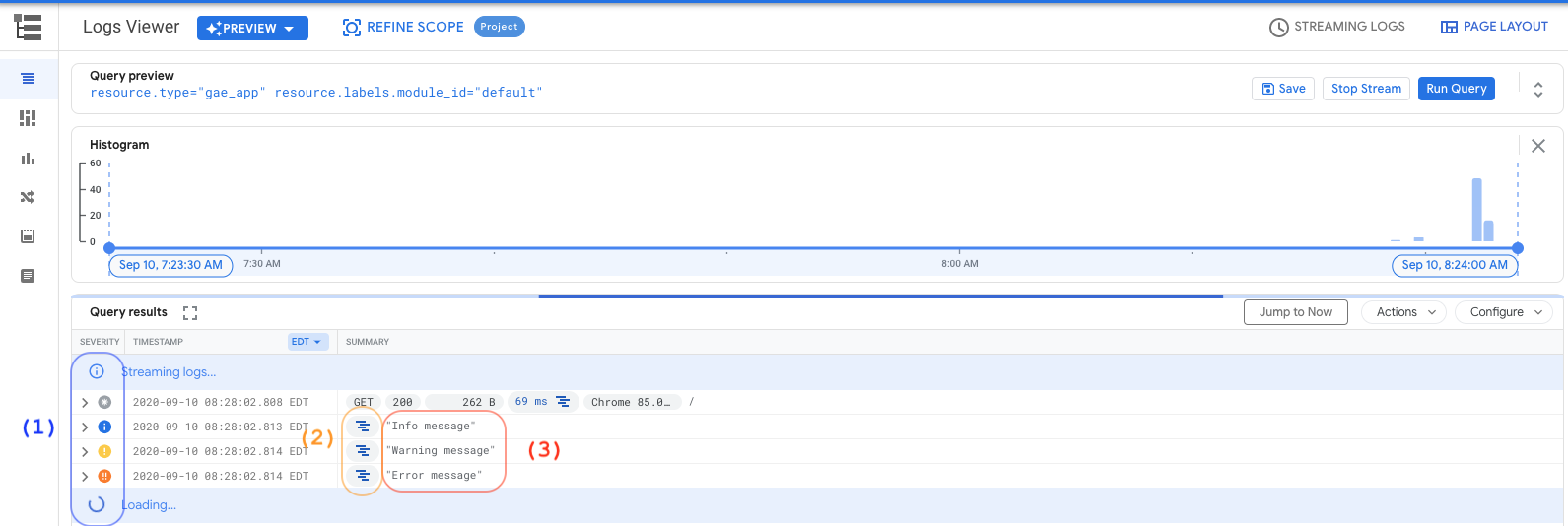
When enabled the JSON appender allows logs to be easily filtered:
Note
If you combine this module with the Stackdriver Trace module, all logs will also have a traceId field, making possible to correlate traces with log entries.
Visual display of log levels
Correlated traceId for tracing when you have enabled cloud tracing
Simplified output without extra fields or ANSI coloring codes
Configuring logging via console
Overriding defaults on logging configuration
If you would like to override the fields that are included in the JsonLayout appender, you can declare it on your own logback configuration instead of including the default from logback-json-appender.xml:
Dynamic appender selection
The JSONLayout comes in hand when using Google Cloud Logging, but when running locally it will make your console logs unreadable. The default logback-json-appender configuration includes both a STDOUT and a CONSOLE_JSON appenders, as well as a dynamic logback property called google_cloud_logging.
You can use that variable to switch your logger appender dynamically.
You logging configuration would look like this:
Note
The environment detection executes a HTTP request to the Google Cloud metadata server. If you rather skip this to improve startup time, just set MICRONAUT_ENVIRONMENTS environment variable or the micronaut.environments System property as described in the reference documentation.
5 Stackdriver Trace
The micronaut-gcp-tracing integrates Micronaut with Cloud Trace from Google Cloud Operations (formerly Stackdriver).
You should then configure the service accounts as per the documentation on service-to-service communication and the enable the filter for the outgoing URI paths you wish to include the Google-signed OAuth ID token:
Micronaut GCP includes extended support for Google Cloud Function - designed for serverless workloads.
7.1 Simple Functions
Micronaut GCP offers two ways to write cloud functions with Micronaut. The first way is more low level and involves using Micronaut’s built in support for functions. Simply add the following dependency to your classpath:
Now define a class that implements one of Google Cloud Found’s interfaces, for example com.google.cloud.functions.BackgroundFunction, and extends from io.micronaut.function.executor.FunctionInitializer.
The following is an example of a BackgroundFunction that uses Micronaut and Google Cloud Function:
When you extend from FunctionInitializer the Micronaut ApplicationContext will be initialized and dependency injection will be performed on the function instance. You can use inject any bean using jakarta.inject.Inject as usual.
Warning
Functions require a no argument constructor hence you must use field injection (which requires lateinit in Kotlin) when injecting dependencies into the function itself.
The FunctionInitializer super class provides numerous methods that you can override to customize how the ApplicationContext is built if desired.
Running Functions Locally
Raw functions cannot be executed locally. They can be tested by instantiating the function and inspecting any side effects by providing mock arguments or mocking dependent beans.
Deployment
When deploying the function to Cloud Function you should use the fully qualified name of the function class as the handler reference.
First build the function with:
$ ./gradlew clean shadowJar
Then cd into the build/libs directory (deployment has to be done from the location where the JAR file resides):
$ cd build/libs
To deploy the function make sure you have gcloud CLI then run:
In the example above myfunction refers to the name of your function and can be changed to whatever name you prefer to name your function. example.function.Function refers to the fully qualified name of your function class.
To obtain the trigger URL you can use the following command:
You can then use this variable to test the function invocation:
$ curl -i $YOUR_HTTP_TRIGGER_URL
7.2 HTTP Functions
It is common to want to take just a slice of a regular Micronaut HTTP server application and deploy it as a function.
Configuration
To facilitate this model, Micronaut GCP includes an additional module that allows you to use regular Micronaut annotations like @Controller and @Get to define your functions that can be deployed to cloud function.
With this model you need to add the micronaut-gcp-function-http dependency to your application:
First to run the function locally you should then make the regular Micronaut server a developmentOnly dependency since it is not necessary to include it in the JAR file that will be deployed to Cloud Function:
This project provides integration between Micronaut and Google Cloud PubSub.
It uses the official Google Cloud Pub/Sub client java libraries to create Publisher and Subscribers while keeping a similar programming model for messaging as the ones defined in Micronaut RabbitMQ and Micronaut Kafka.
Support is provided for the Pull (for long-running processes) and Push (ideal for serverless environments such as Cloud Run) styles of message consumption using a consistent programming model.
Important
The project does not attempt to create any of the resources in Google Cloud such as Topics and Subscription. Make sure your project has the correct resources and the Service Account being used has proper permissions.
9.2 Quickstart
To add support for Google Cloud Pub/Sub to an existing project, add the following dependencies to your build.
To publish messages to Google Cloud Pub/Sub, just define an interface that is annotated with @PubSubClient.
Note
Make sure your current GCP project has a topic named animals before starting the application.
At compile time Micronaut will create an implementation of the above interface. You can then inject that interface on your business methods via @Inject and use it.
Creating a Pub/Sub Pull Subscriber with @PubSubListener and @Subscription
To listen to Pub/Sub messages you can use @PubSubListener annotation on a class to mark it as a message listener.
The following example would listen on a subscription named animals that is configured to be attached to the topic of the previous example.
Methods annotated with @Subscription will use a long-running Pull subscription style.
Creating a Pub/Sub Push Subscriber with @PubSubListener and @PushSubscription
Using the Push style of subscription is similar to the above example, only substituting the @PushSubscription annotation instead.
The following example would listen on a subscription named animals-push that is configured to be attached to the same topic of the previous example.
Methods annotated with @PushSubscription will the Push subscription style, where messages are delivered to the application via HTTP request.
9.3 Pub/Sub configuration Properties
You can customize certain aspects of the client.
Pub/Sub client libraries leverage a ScheduledExecutorService for both message publishing and consumption.
If not specified the framework will configure the framework default Scheduled executor service to be used for both Publishers and Subscribers.
See ExecutorConfiguration for the full list of options.
You can override it at PubSubConfigurationProperties to make a default value for all clients, or you can setup per Topic Publisher, or Subscription listener as discussed further bellow.
When the application is shutting down, stopAsync() is invoked on all of the running GCP library Subscriber instances. The subscribers will attempt to fully process all pending in-memory messages before releasing the configured executor threads. By default, the framework will in turn continue to invoke the bound subscription methods on all @PubSubListener beans until all messages have been processed. To discontinue processing of messages and enable faster shutdown, the gcp.pubsub.nack-on-shutdown property can be set to true, which will cause all pending unprocessed messages that have not yet reached a subscriber method to be eagerly nacked, which will cause PubSub to redeliver them according to each subscription’s configuration.
9.4 Pub/Sub Publishers
Pub/Sub support in micronaut follows the same pattern used for other types of clients such as the HTTP Client.
By annotating an interface with @PubSubClient the framework will create an implementation bean that handles communication with Pub/Sub for you.
Topics
In order to publish messages to Pub/Sub you need a method annotated with a @Topic annotation.
For each annotated method the framework will create a dedicated Publisher with its own configuration for RetrySettings, BatchSettings and its own Executor.
All settings can be overridden via configuration properties and the appropriate configuration can be passed via the configuration attribute of the @Topic annotation.
Important
If a body argument cannot be found, an exception will be thrown.
Resource naming
On the previous examples you noticed we used a simple naming for the topic such as animals. Inside Google Cloud however resources are only accessible via their FQN.
In Pub/Sub case topics are named as projects/$PROJECT_ID/topics/$TOPIC_NAME.
Micronaut integration with GCP will automatically grab the default project id available (please refer to the section Google Project Id ) and convert the simple naming of the resource into a FQN.
You can also support a FQN that uses a different project name, that is useful when your project has to publish message to more than the default project configured for the Service Account.
Note
When publishing to a different project, make sure your service account has the proper access to the resource.
9.4.1 Content-Type and message serialization
The contents of a PubSubMessage are always a base64 encoded ByteString.
This framework provide a way to create custom Serialization/Deserialization as explained in the section Custom Serialization/Deserialization.
By default any body message argument will be serialized via JsonPubSubMessageSerDes unless specified otherwise via the contentType property of the @Topic annotation.
The rules of message serialization are the following:
If the body type is PubSubMessage then SerDes is bypassed completely and no header is added to the message.
If the body type is byte[] SerDes logic is bypassed, but a Content-Type header of application/json will be added unless overwritten by the @Topic annotation.
For any other type, the type defined by contentType will be used to located the correct PubSubMessageSerDes to handle it, if none is passed application/json will be used.
9.4.2 Message Headers
Google Cloud Pub/Sub messages contain a dictionary of message attributes in the form of a Map<String, String>.
The framework binds those attributes to a @Header annotation that can be used at the class level or to the method or an argument of the method.
9.4.3 Publisher properties
Pub/Sub allows each Publisher to have its own configuration for things such as executors or batching settings.
This is useful when you need to publish messages to topic that uses different SLAs.
The framework allows you to create configurations and then bind those configurations to each topic annotation using the configuration parameter.
Controls the change in retry delay. The retry delay of the previous call is multiplied by the RetryDelayMultiplier to calculate the retry delay for the next call. Default: 1.3
gcp.pubsub.publisher.*.retry.max-retry-delay
org.threeten.bp.Duration
Puts a limit on the value of the retry delay, so that the RetryDelayMultiplier can’t increase the retry delay higher than this amount. Default: 60 seconds
gcp.pubsub.publisher.*.retry.max-attempts
int
Defines the maximum number of attempts to perform. Default: 0
gcp.pubsub.publisher.*.retry.jittered
boolean
Determines if the delay time should be randomized. Default: true
gcp.pubsub.publisher.*.retry.initial-rpc-timeout
org.threeten.bp.Duration
Controls the timeout for the initial RPC. Default: 5 seconds
Controls the change in RPC timeout. The timeout of the previous call is multiplied by the RpcTimeoutMultiplier to calculate the timeout for the next call. Default: 1.0
gcp.pubsub.publisher.*.retry.max-rpc-timeout
org.threeten.bp.Duration
Puts a limit on the value of the RPC timeout, so that the RpcTimeoutMultiplier can’t increase the RPC timeout higher than this amount. Default 0
Set the element count threshold to use for batching. After this many elements are accumulated, they will be wrapped up in a batch and sent. Default: 100
Set the request byte threshold to use for batching. After this many bytes are accumulated, the elements will be wrapped up in a batch and sent. Default 1000 (1Kb)
gcp.pubsub.publisher.*.batching.delay-threshold
org.threeten.bp.Duration
Set the delay threshold to use for batching. After this amount of time has elapsed (counting from the first element added), the elements will be wrapped up in a batch and sent. Default 1ms
gcp.pubsub.publisher.*.batching.is-enabled
java.lang.Boolean
Indicate if the batching is enabled. Default : true
FlowControlSettings are actually configured for the BatchingSettings property, due the nature of Google’s Builders the configuration was
flattened at PubSubConfigurationProperties level, and it’s injected it into the RetrySettings later.
9.4.4 Retrieving message Ids (broker acknowledge)
All the examples so far have been using void on the method signature. However getting a message acknowledge from the broker is usually required.
Pub/Sub returns a String object that contains the message id that the broker generated. Your methods can also be defined using either String or Single<String> (for reactive support).
When you define your client you can actually choose between a few different method signatures.
Depending on your choice you may get the message acknowledge back and control if the method is blocking or reactive.
If your method has void as a return, then a blocking call to publish the message is made and you don’t get the message id returned by the Pub/Sub broker.
If your method return a String then a blocking call to publish the message is made and the message id is returned.
If your method returns Single<String> then it’s a reactive call, and you can subscribe to the publisher to retrieve the message id.
9.5 Restricting locations and message ordering
Restricting storage locations
Google Cloud Pub/Sub is a globally distributed event platform. When a client publishes a message, the platform stores the message on the nearest region to the publisher.
Sometimes regulations such as GDPR impose restrictions on where customer data can live. When using Micronaut integration you can
specify the endpoint of the topic, either via the topic annotation or properties, so that Pub/Sub will persist the message data on the specified region.
To learn more about this feature visit the resource location restriction page.
Message ordering
Google Cloud Pub/Sub supports message ordering if messages are published to a single location, and specify an ordering key.
An example of this would be trading orders placed for a specific symbol. If you use the symbol as the ordering key, all messages regardless of how many publishers are guaranteed to be delivered in order.
To enable message ordering for your publishers, use the @OrderingKey in one of the method’s arguments to declare it an ordering key.
Here’s an example of how to use ordering on your clients:
import io.micronaut.gcp.pubsub.support.Order;import jakarta.inject.Singleton;@Singletonpublic final class OrderService { private final OrderClient client; public OrderService(OrderClient client) { this.client = client; } public void placeOrder() { Order order = new Order(100, "GOOG"); client.send(order, order.getSymbol()); }}
import io.micronaut.gcp.pubsub.support.Orderimport jakarta.inject.Singleton@Singletonclass OrderService(private val client: OrderClient) { fun placeOrder() { val order = Order(100, "GOOG") client.send(order, order.symbol) }}
import io.micronaut.gcp.pubsub.support.Orderimport jakarta.inject.Singleton@Singletonclass OrderService { private final OrderClient client OrderService(OrderClient client) { this.client = client } void placeOrder() { Order order = new Order(100, "GOOG") client.send(order, order.getSymbol()) }}
9.6 Receiving messages via @PubSubListener methods
To start receiving messages you annotate a class with @PubSubListener, the framework will then use AOP to deliver messages to methods annotated with either @Subscription or @PushSubscription.
Note
The semantics for how methods work when annotated with these two different subscription annotations are identical, differing only by the infrastructure that the framework transparently sets up to deliver the messages. In the following examples, @Subscription can be exchanged for @PushSubscription and the behavior will be the same except for some minor differences noted in the following sections.
Subscriptions
Pull Subscriptions
All methods annotated with @Subscription will be invoked by the framework in response to receiving messages via Pull subscription.
Each annotated method creates an individual Subscriber,
that can be configured using the configuration parameter of the @Subscription annotation.
Pull subscriptions are long-running processes that continually poll the PubSub service, and are meant to be used in an environment such as Google Kubernetes Engine.
Push Subscriptions
Methods annotated with @PushSubscription will be invoked by the framework in response to receiving messages via Push subscription.
Push messages are sent to the application by the PubSub service via HTTP request, making them an ideal fit for serverless environments such as Cloud Run.
When Push subscriptions are enabled, the application will expose a single HTTP endpoint for processing all push requests, and messages will be routed to the matching PushSubscription method. The default path for this endpoint is /push. This endpoint URL must be specified when setting up a Push subscription in GCP.
Note
As Push message handling uses HTTP, you must have a Micronaut HTTP server implementation available on your classpath, or else push handling will be disabled.
Note
The available parameters of the @PushSubscription annotation are identical to those of @Subscription, except for configuration which is relevant only to Pull subscriptions.
Important
Methods annotated with @Subscription or @PushSubscription must be unique in your application.
If two distinct methods try to subscribe to the same Subscription an error is thrown.
This is intended to avoid issues with message Acknowledgement control.
Important
The annotated method must have at least one argument that is bound to the body of the message or an exception is thrown.
Resource naming
Just as described in the Pub/Sub Publisher section, subscriptions also use simple names such as animals.
Inside Google Cloud however resources are only accessible via their FQN. A Subscription name follows the pattern: projects/$PROJECT_ID/subscriptions/$SUBSCRIPTION_NAME.
Micronaut integration with GCP will automatically grab the default project id available (please refer to the section Google Project Id ) and convert the simple naming of the resource into a FQN.
You can also pass a FQN as the subscription name.
This is helpful when you need to listen to subscriptions from different projects.
Note
When publishing to a different project, make sure your service account has the proper access to the resource.
9.6.1 Content-Type and message deserialization
The framework provides a custom serialization/deserialization (SerDes) mechanism for both message producers and message listeners.
On the receiving end the rules to deserialize a PubSubMessage are the following:
If the body argument of the method is of PubSubMessage type, SerDes is bypassed and the "raw" message is copied to the argument.
If the body argument of the method is a byte array, SerDes is bypassed and the byte contents of the PubSubMessage are copied to the argument.
If the body argument is a Pojo then the following applies:
The default Content-Type is application/json and the framework will use it if not overridden
If the message contains an attribute Content-Type that value is used
Finally if the @Subscription or @PushSubscription has a contentType value this value overrides all of the previous values
Automatic SerDes is a nice feature that the framework offers, but sometimes you may need to have access to the PubSubMessage id.
This is provided via the @MessageId annotation.
Once you annotate an argument of type String with this annotation, the message id will be copied to that argument.
Important
PubSubMessage ids are always of type String, thus your annotated argument must also be a String.
Though the deserialization is identical for @PushSubscription methods, one thing that requires additional consideration is that since Push messages are delivered via HTTP the subscriber methods will be executed on the main HTTP event loop thread by default. Care must be taken not to block the event loop thread.
As a convenience, @PushSubscription methods that are known to use blocking operations during the course of message processing may be annotated with @ExecuteOn. This will cause the invocation of the method to occur in a separate thread using the ExecutorService specified in the annotation.
If all the subscriber methods in a given @PubSubListener class are known to be blocking, then the @ExecuteOn annotation may be used at the class level instead and all @PushSubscription methods in that class will be executed by the specified ExecutorService.
Note
If you use the TaskExecutors.BLOCKINGExecutorService, Virtual Threads will be used if available.
The following example is equivalent to the preceding one, except using @ExecuteOn at the class level and @PushSubscription methods:
9.6.2 Receiving and Returning Reactive Types
In addition to byte[], PubsubMessage, and POJOs you can also define listener methods that receive a Reactive type such as a Reactor Mono or a RxJava Single. The same deserialization rules as above will be applied using the type parameter of the Reactive type.
For the conversion to Reactive types to work correctly, you must add either the library Micronaut Reactor or Micronaut RxJava 3 to your application’s dependencies.
For example, using Reactor:
Using Reactive Types
Using Reactor with push subscriptions is similar:
Using Reactive Types With Push Subscriptions
Note that the above examples all return a Mono<Object> to allow for a fully non-blocking reactive message processing pipeline. When a Publisher is returned from a @Subscription method, it will be subscribed to by the framework and the message will not be auto-acknowledged until the Publisher completes successfully. If the Publisher completes with an error, the framework will nack() the message for re-delivery.
9.6.3 Message Headers
Google Cloud Pub/Sub messages contain a dictionary of message attributes in the form of a Map<String, String>.
The framework binds those attributes to a @Header annotation that can be used at an argument of the method.
A ConversionService is used to try to convert from the String value of the attribute to the target type on the method.
9.6.4 Pull Subscriber properties
Pub/Sub allows each Pull Subscriber to have its own configuration for things such as executors or flow control settings.
The framework allows you to create configurations and then bind those configurations to each @Subscription using the configuration parameter.
Push support is enabled by default if the Micronaut HTTP server support is on the classpath. It can be explicitly disabled via configuration (see the table below).
The push endpoint is exposed at /push by default. This path is also configurable.
9.6.6 Handling message acknowledgement
When messages are delivered to @Subscription and @PushSubscription methods, they are by default auto-acknowledged to the PubSub service if the method returns without exceptions. When an error occurs during processing, a nack signal will be sent to the service instead, potentially resulting in redelivery of the message.
Google Cloud Pub/Sub controls delivery behavior in response to nack signals at the Subscription level, please refer to the Pub/Sub Subscriber documentation for more information
It is possible to have manual acknowledgement control by adding an argument of type Acknowledgement and manually invoking ack() or nack() methods..
Tip
If you provide an Acknowledgement type in your method and forget to invoke ack()/nack() the framework will log a warning message to let you know if you forgot to manually register an acknowledgement. Messages that are processed without an ack or nack signal being sent could potentially cause undesired behavior that could negatively affect performance.
The following example shows usage of manual acknowledgement:
Manual Acknowledgement of Pull Messages
import io.micronaut.context.annotation.Requires;import io.micronaut.gcp.pubsub.annotation.PubSubListener;import io.micronaut.gcp.pubsub.annotation.Subscription;import io.micronaut.gcp.pubsub.support.Animal;import io.micronaut.messaging.Acknowledgement;import reactor.core.publisher.Mono;@PubSubListenerpublic class AcknowledgementSubscriber { private final MessageProcessor messageProcessor; public AcknowledgementSubscriber(MessageProcessor messageProcessor) { this.messageProcessor = messageProcessor; } @Subscription("animals") public void onMessage(Animal animal, Acknowledgement acknowledgement) { if (Boolean.TRUE.equals(messageProcessor.handleAnimalMessage(animal).block())) { acknowledgement.ack(); } else { acknowledgement.nack(); } } @Subscription("animals-async") public Mono<Boolean> onReactiveMessage(Mono<Animal> animal, Acknowledgement acknowledgement) { return animal.flatMap(messageProcessor::handleAnimalMessage) .doOnNext(result -> { if (Boolean.TRUE.equals(result)) { acknowledgement.ack(); } else { acknowledgement.nack(); } }); }}
During message handling for listeners errors can happen at the framework or at your method level such as:
Problems binding method arguments to the message body
Content-Type deserialization issues
Acknowledgement
Uncaught exceptions at the annotated method
The framework provides a Global Error Handler DefaultPubSubMessageReceiverExceptionHandler, this handler will catch any errors and just log it. This behavior is far from ideal as messages would continue to be redelivered since they are not acknowledged.
The PubSubMessageReceiverException contains references to the originating bean that threw the exception as well as a reference to PubSubConsumerState which has state information regarding the message handling.
9.6.8 Custom Parameter Binding
Default Binding Functionality
Consumer argument binding is achieved through an ArgumentBinderRegistry that is specific for binding consumers from Pub/Sub messages.
The class responsible for this is the PubSubBinderRegistry.
The registry supports argument binders that are used based on an annotation applied to the argument or the argument type. All argument binders must implement either PubSubAnnotatedArgumentBinder or PubSubTypeArgumentBinder.
The exception to that rule is the PubSubDefaultArgumentBinder which is used when no other binders support a given argument.
When an argument needs bound, the PubSubConsumerState is used as the source of all of the available data.
The binder registry follows a small sequence of steps to attempt to find a binder that supports the argument.
Search the annotation based binders for one that matches any annotation on the argument that is annotated with @Bindable.
Search the type based binders for one that matches or is a subclass of the argument type.
Return the default binder.
Custom Binding
To inject your own argument binding behavior, it is as simple as registering a bean. The existing binder registry will inject it and include it in the normal processing.
Annotation Binding
A custom annotation can be created to bind consumer arguments. A custom binder can then be created to use that annotation and the PubSubConsumerState to supply a value for the argument.
The value may in fact come from anywhere, however for the purposes of this documentation, we will show how you would create an annotation to bind the message publish time.
Tip
You could also return a com.google.protobuf.Timestamp if you register the appropriate type converter to the conversion service, but such example is outside of the scope of this documentation.
The annotation can now be used on the argument in a consumer method.
The serialization and deserialization of message bodies is handled through instances of PubSubMessageSerDes.
The ser-des (Serializer/Deserializer) is responsible for both serialization and deserialization of Pub/Sub message bodies into the message body types defined in your clients and consumers methods.
The ser-des are managed by a PubSubMessageSerDesRegistry.
All ser-des beans are injected in order into the registry and then searched for when serialization or deserialization is needed.
The search is based on the Content-Type defined for the message, the framework default is application/json.
If a ser-des can’t be located an exception is thrown.
You can supply your own ser-des by simply registering a bean of type PubSubMessageSerDes.
For example let’s say you want to implement a ser-des that uses java native object serialization instead of the Json serialization provided.
First you need to define a custom mimeType for that, we will use application/x.java, following the best principles for handling mime types.
Note
This is a fictional example, java serialization is not ideal, and its not portable.
To publish messages with this ser-des set the Content-Type for @Topic
If the messages that are arriving on your subscriber already contain a Content-Type header with this type the framework will pick it up, or you can just force it on the @Suibscription annotation too.
Pub/Sub client libraries require an ScheduledExecutorService for both Publisher and Subscriber make sure your custom executor is of type scheduled or an error will be thrown.
If no configuration is supplied, the framework will use the default named scheduled executor.
9.9 Using Google Cloud Pub/Sub emulator
Google Cloud Pub/Sub has a local emulator to enable developers to test their applications locally with no need to connect to the cloud Pub/Sub service.
The framework supports automatic switching of the TransportChannelProvider to use PUBSUB_EMULATOR_HOST if this variable is set on the environment.
Note
Make sure that you also set GCP_PROJECT_ID to be the same as the project you have configured the emulator to use. Otherwise the framework may pick up the projectId used by the default credentials.
You will need to manually configure topics and subscriptions on the emulator if you want to test locally. You can easily create resources using the Pub/Sub REST interface to create topics and subscriptions.
For instance, the following curl command would create a topic named micronaut-devices on the test-project project.
The Pub/Sub emulator does not provide any built-in support for simulating Push messages. That said, testing your PushSubscription endpoints can be done simply by using Micronaut’s HttpClient in to simulate delivery of Push messages.
NOTE: Missing tag `injectBlient` in `test-suite/src/test/java/io/micronaut/gcp/pubsub/subscriber/ContentTypePushSubscriberSpec.java`.
NOTE: Missing tag `injectBlient` in `test-suite-groovy/src/test/groovy/io/micronaut/gcp/pubsub/subscriber/ContentTypePushSubscriberSpec.groovy`.
The data to be sent must be encoded as a Base64 String
The fully qualified subscription name must be specified
The message is sent to the /push endpoint
10 Google Cloud Secret Manager Support
Google Cloud Secret Manager is a secure and convenient storage system for API keys, passwords, certificates, and other sensitive data.
Applications can also use it to store configuration files and use it as secure distributed repository of metadata.
To add support for Google Cloud Secret Manager to an existing project, add the following dependencies to your build.
For configuration files stored in Secret Manager, prefer micronaut.config.import with the Google Secret Manager importer. For direct runtime secret access from application code, inject SecretManagerServiceClient or use SecretManagerClient.
10.1 Distributed Configuration
You can use Distributed Configuration with Google Cloud Secret Manager by importing specific secrets through micronaut.config.import.
This is the preferred approach for new applications because it avoids bootstrap-specific wiring and makes each imported secret explicit.
Important
Make sure you have configured credentials following the Setting up GCP section, and that the configured identity can read the target secrets. If you need more information, see the official Secret Manager access control documentation.
Importing a configuration secret
Store a configuration payload such as YAML, JSON, or properties in a Secret Manager secret. Secret Manager does not keep file extensions, so the importer either uses the configured format or defaults to YAML-style parsing for extensionless secrets.
In that form, credentials-location maps directly to the importer option of the same name. If you need encoded-key, prefer the structured import form below so the Base64 value does not need URI escaping. If neither credential option is supplied, the importer falls back to Application Default Credentials.
Structured import declarations
If you need to pass extra options such as credentials, project id, or regional location, use the structured import form:
Explicit payload format such as yml, yaml, json, or properties
location
Regional Secret Manager location for regional secrets
version
Secret version to import; defaults to latest
credentials-location
Path to a service account credentials file used only for this import
encoded-key
Base64 encoded service account credentials used only for this import
optional
Marks the import as optional
When credentials-location and encoded-key are both absent, the importer falls back to Google Application Default Credentials, using the same resolution order described in the Setting up GCP section.
Retry options
gcp-secret-manager imports also support the standard retry options provided by RetryablePropertySourceImporter. These options work with both scalar connection-string imports and structured import declarations.
The older bootstrap/config-client based integration remains available for existing applications. It still supports default config resolution such as application, application_{env}, [APPLICATION_NAME], and [APPLICATION_NAME]_{env}, plus custom-configs and keys.
For new development, prefer micronaut.config.import. Use the bootstrap configuration path only when you need the legacy default secret resolution behavior.
Legacy default config resolution
When using the legacy bootstrap configuration client, the following secrets are fetched by default:
Name
Description
application
Configuration shared by all applications
application_${env}
Environment-specific configuration
[APPLICATION_NAME]
Application-specific configuration
[APPLICATION_NAME]_${env}
Application-specific configuration for an environment
The legacy bootstrap path can also disable default config resolution with gcp.secret-manager.default-config-enabled=false, whitelist additional config secrets through gcp.secret-manager.custom-configs, and whitelist single-value secrets through gcp.secret-manager.keys.
Secret Versioning
Google Cloud Secret Manager supports secret versioning. For the current import support in this module, config imports load the latest version of the named secret by default, but you can explicitly override the version.
10.2 Low-Level Secret Manager Client access
Accessing Secret Manager via client libraries
If you need startup configuration import, use the distributed configuration support described in Distributed Configuration. The client APIs described here are for direct application code access to secrets.
Similarly, if you require access to Secret Manager for the regional secrets via the Google client java libraries, you can use the bean of type SecretManagerServiceClient for injection.
To leverage the regional endpoints for the SecretManagerServiceClient, you must set gcp.secret-manager.location to one of the available locations.
Micronaut Secret Manager Client
If you rather not deal with Google gRPC libraries, internally the framework uses a wrapper client: SecretManagerClient that provides a reactive based approach:
Tip
You can use the client libraries at any point in time of your runtime, however it’s advised that secrets should be loaded only once during application startup, to reduce latency of the remote call as well as costs associated with secret retrieval.
Similarly, if you want to access regional secrets using the wrapper client: SecretManagerClient in a reactive based approach, then you must set gcp.secret-manager.location to one of the available locations.
11 Google Cloud Storage Support
Micronaut provides a high-level, uniform object storage API that works across the major cloud providers: Micronaut Object Storage.
To get started, select the object-storage-gcp feature in Micronaut Launch, or add the following dependency:
This section documents breaking changes between Micronaut GCP versions:
Micronaut GCP 6.0.0
The factory constructor io.micronaut.gcp.credentials.GoogleCredentialsFactory(GoogleCredentialsConfiguration) deprecated previously has been removed.
GoogleCredentialsFactory(GoogleCredentialsConfiguration, HttpTransportFactory) is used instead.
The Singleton constructor io.micronaut.gcp.pubsub.bind.PubSubBodyBinder(PubSubMessageSerDesRegistry) deprecated previously has been removed.
PubSubBodyBinder(ConversionService, PubSubMessageSerDesRegistry) is used instead.
The exception constructor io.micronaut.gcp.pubsub.exception.PubSubMessageReceiverException(String, Object, PubSubConsumerState) deprecated previously has been removed.
It was used internally by the framework and is no longer needed.
The exception constructor io.micronaut.gcp.pubsub.exception.PubSubMessageReceiverException(String, Throwable, Object, PubSubConsumerState) deprecated previously has been removed.
It was used internally by the framework and is no longer needed.
14 Repository
You can find the source code of this project in this repository: