

On this page
Graphql
Micronaut supports GraphQL via the micronaut-graphql module.
For this project, you can find a list of releases (with release notes) here:
This section documents breaking changes between Micronaut GraphQL versions:
Micronaut GraphQL 5.0.0
-
The Apollo Websocket protocol (subscriptions-transport-ws) classes and configuration deprecated previously have all been removed. Refer to the version 4.0.0 breaking changes notes for details.
-
The Controller class GraphiQLController was previously instantiated with the deprecated
GraphQLApolloWsConfigurationtype. That is changed toGraphQLConfiguration.
Micronaut GraphQL 4.0.0
The Apollo Websocket protocol (subscriptions-transport-ws) classes and configuration have been refactored and deprecated to pave the way for a newer websocket protocol (graphql-ws). The subscriptions-transport-ws protocol will be removed in a future version and client code should be migrated to use the new protocol. To continue using the subscriptions-transport-ws protocol, the following must be considered when upgrading:
-
The configuration prefix for subscriptions-transport-ws is changed from
graphql-wstographql-apollo-ws -
The implementation classes for subscriptions-transport-ws have moved from the
io.micronaut.configuration.graphql.wspackage toio.micronaut.configuration.graphql.ws.apollo. The implementation for the newer protocol has taken their place inio.micronaut.configuration.graphql.ws -
The implementation classes for subscriptions-transport-ws have been renamed from
GraphQLWs*toGraphQLApolloWs*. For example,GraphQLWsConfigurationis nowGraphQLApolloWsConfiguration.
Create your application via the Command Line tool:
mn create-app helloworld --features=graphqlIf you already have an application, add the micronaut graphql dependency:
implementation("io.micronaut.graphql:micronaut-graphql")Configure the /graphql endpoint by adding to application.yml:
graphql:
  enabled: true
  graphiql: # enables the /graphiql endpoint to test calls against your graph.
    enabled: true
And then in the resources folder, create a file named schema.graphqls.
This file will contain the definition of your GraphQL schema.
In our case, it will contain the following:
type Query {
    hello(name: String): String!
}
Create a DataFetcher for the hello query:
import graphql.schema.DataFetcher;
import graphql.schema.DataFetchingEnvironment;
import jakarta.inject.Singleton;

@Singleton
public class HelloDataFetcher implements DataFetcher<String> {

    @Override
    public String get(DataFetchingEnvironment env) {
        String name = env.getArgument("name");
        if (name == null || name.trim().isEmpty()) {
            name = "World";
        }
        return String.format("Hello %s!", name);
    }
}And then create the GraphQL bean:
import graphql.GraphQL;
import graphql.schema.GraphQLSchema;
import graphql.schema.idl.RuntimeWiring;
import graphql.schema.idl.SchemaGenerator;
import graphql.schema.idl.SchemaParser;
import graphql.schema.idl.TypeDefinitionRegistry;
import io.micronaut.context.annotation.Bean;
import io.micronaut.context.annotation.Factory;
import io.micronaut.core.io.ResourceResolver;
import jakarta.inject.Singleton;

import java.io.BufferedReader;
import java.io.InputStreamReader;

@Factory //
public class GraphQLFactory {

    @Bean
    @Singleton
    public GraphQL graphQL(ResourceResolver resourceResolver, HelloDataFetcher helloDataFetcher) { //

        SchemaParser schemaParser = new SchemaParser();
        SchemaGenerator schemaGenerator = new SchemaGenerator();

        // Parse the schema.
        TypeDefinitionRegistry typeRegistry = new TypeDefinitionRegistry();
        typeRegistry.merge(schemaParser.parse(new BufferedReader(new InputStreamReader(
                resourceResolver.getResourceAsStream("classpath:schema.graphqls").get()))));

        // Create the runtime wiring.
        RuntimeWiring runtimeWiring = RuntimeWiring.newRuntimeWiring()
                .type("Query", typeWiring -> typeWiring
                        .dataFetcher("hello", helloDataFetcher))
                .build();

        // Create the executable schema.
        GraphQLSchema graphQLSchema = schemaGenerator.makeExecutableSchema(typeRegistry, runtimeWiring);

        // Return the GraphQL bean.
        return GraphQL.newGraphQL(graphQLSchema).build();
    }
}You should be all set.
Start your application by running ./gradlew run, open your browser to your local graphiql, and you should be able to run the following queries:
Query without params:
query {
    hello
}
Returns:
{
  "data": {
    "hello": "Hello World!"
  }
}
Query with params:
query {
    hello(name: "Micronaut")
}
Returns:
{
  "data": {
    "hello": "Hello Micronaut!"
  }
}Micronaut 1.0.3 or above is required, and you must have the micronaut-graphql dependency on your classpath:
implementation("io.micronaut.graphql:micronaut-graphql")The micronaut-graphql module transitively includes the com.graphql-java:graphql-java dependency and provides a Micronaut
GraphQLController which enables query execution via HTTP.
As outlined in https://graphql.org/learn/serving-over-http the following HTTP requests are supported:
-
GETrequest withquery,operationNameandvariablesquery parameters. Thevariablesquery parameter must be json encoded. -
POSTrequest withapplication/jsonbody and keysquery(String),operationName(String) andvariables(Map). -
POSTrequest withmultipart/form-databody using the GraphQL multipart request specification.
Both produce a application/json response.
By default, the GraphQL endpoint is exposed on /graphql but this can be changed via the graphql.path application property.
You only must configure a bean of type graphql.GraphQL containing the GraphQL schema and runtime wiring.
When GraphQL Java resolves nested fields through its default property lookup, Micronaut GraphQL first uses Micronaut bean introspection before falling back to GraphQL Java’s default behavior. This means @Introspected result types work without additional reflection metadata in native image builds, while applications with a custom GraphQL Java default data fetcher keep their existing behavior.
The graphql.GraphQL bean can be defined by solely using the GraphQL Java implementation,
or in combination with other integration libraries like GraphQL Java Tools
or GraphQL SPQR. As mentioned before the first one is added as transitive dependency, other
integration libraries must be added to the classpath manually.
Below is a typical example of a Micronaut Factory class
configuring a graphql.GraphQL Bean using the
GraphQL Java library.
If a schema field relies on GraphQL Java’s default property resolution instead of an explicit DataFetcher, Micronaut GraphQL uses Micronaut bean introspection before falling back to GraphQL Java’s default property fetcher. For native image applications, annotate returned domain types with @Introspected so nested properties can be resolved without additional reflection metadata. If you have configured a custom GraphQL Java default data fetcher, Micronaut GraphQL preserves that custom configuration.
There are various examples using different technologies provided in the repository.
For an example that combines GraphQL Java Tools with a request-scoped DataLoaderRegistry, see the Using DataLoaders
section and the todo-java-tools example in this repository.
GraphQL multipart requests can be sent to the configured GraphQL endpoint using multipart/form-data
following the GraphQL multipart request specification.
Micronaut GraphQL expects the multipart request to contain:
-
an
operationspart with the GraphQL request payload as JSON -
a
mappart describing which uploaded file part is injected into which GraphQL variables path -
one or more file parts referenced by the
map
Uploaded files are exposed to GraphQL as Micronaut
CompletedFileUpload
instances, so your GraphQL schema and runtime wiring must provide a compatible Upload scalar that accepts
CompletedFileUpload values.
scalar Upload

input UploadInput {
  files: [Upload!]!
}

type Mutation {
  upload(input: UploadInput!): Boolean!
}
After registering an Upload scalar, a multipart upload can be sent like this:
curl "$MICRONAUT_URL/graphql" \
  -F 'operations={"query":"mutation ($input: UploadInput!) { upload(input: $input) }","variables":{"input":{"files":[null]}}}' \
  -F 'map={"0":["variables.input.files.0"]}' \
  -F '0=@upload.txt;type=text/plain'
The GraphQL data fetcher can then read the injected upload from the variables as a CompletedFileUpload.
A Micronaut application can expose java-dataloader instances to GraphQL
by defining a request-scoped org.dataloader.DataLoaderRegistry bean.
The todo-java-tools example in this repository shows the full flow when using
GraphQL Java Tools:
-
example.graphql.DataLoaderRegistryFactorycreates a newDataLoaderRegistryfor each request and registers theauthorloader. -
example.graphql.AuthorDataLoaderimplementsMappedBatchLoader<String, Author>and batches the author lookups by delegating toAuthorRepository#findAllById. -
example.graphql.ToDoResolvergets the loader fromgraphql.schema.DataFetchingEnvironmentand callsload(todo.getAuthorId())when theauthorfield is resolved.
This pattern matters for two reasons:
-
The registry should be
@RequestScopeso every GraphQL request gets a fresh loader cache. -
GraphQL does not invoke java-dataloader
DataLoader`s automatically.
A resolver or `DataFetcher
must obtain the loader from theDataFetchingEnvironmentand callload(…)for the field that should be batched.
You can explore the example here:
The micronaut-graphql module comes bundled with support for GraphQL over web sockets.
Support is provided for the graphql-ws protocol (https://github.com/enisdenjo/graphql-ws/blob/master/PROTOCOL.md).
GraphQL over web sockets via the current graphql-ws protocol must be explicitly enabled via the graphql.graphql-ws.enabled application property.
The following configuration properties can be set for the graphql-ws support:
There is an example present chat, that features a very basic chat application. For real applications the subscriptions are usually based on some pub/sub solution. An example using subscriptions with kafka can be found here, graphql-endpoint using micronaut.
The micronaut-graphql module comes bundled with GraphiQL, an in-browser IDE for exploring GraphQL.
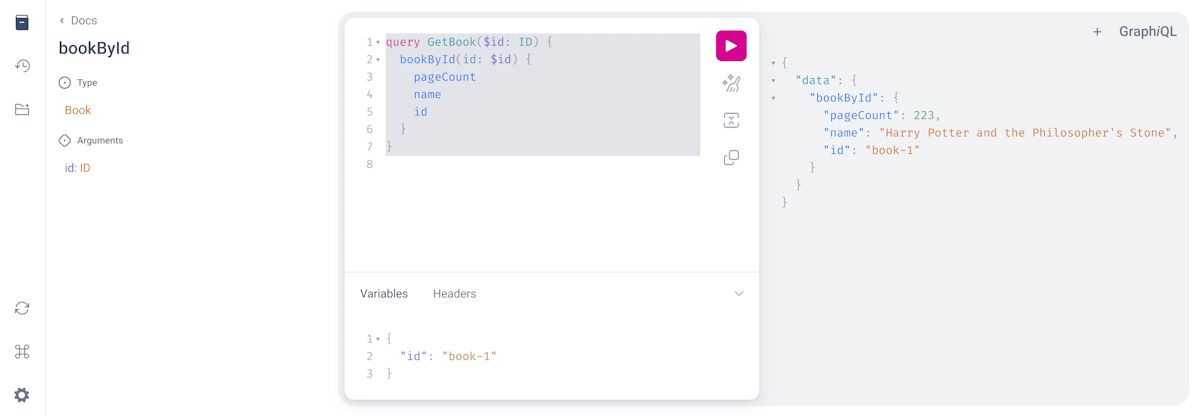
GraphiQL must be explicitly enabled via the graphql.graphiql.enabled application property.
The following configuration properties can be set:
The out of the box rendered GraphiQL page does not provide many customisations except the GraphiQL version, path and page title.
It also takes into account the graphql.path application property,
to provide a seamless integration with the configured GraphQL endpoint path.
If further customisations are required, a custom GraphiQL
template
can be provided. Either by providing the custom template at src/main/resources/graphiql/index.html or via the graphiql.template-path
application property pointing to a different template location.
In that case it could also be useful to dynamically replace additional parameters in the template via the graphql.graphiql.template-parameters
application property.
If you are using Jackson serialization instead of Micronaut Serialization, you need to configure your application to keep empty and null values in the serialized JSON.
This is done via:
jackson.serialization-inclusion=ALWAYSSee the following list of guides to learn more about working with GraphQL in the Micronaut Framework:
You can find the source code of this project in this repository: